Where to start
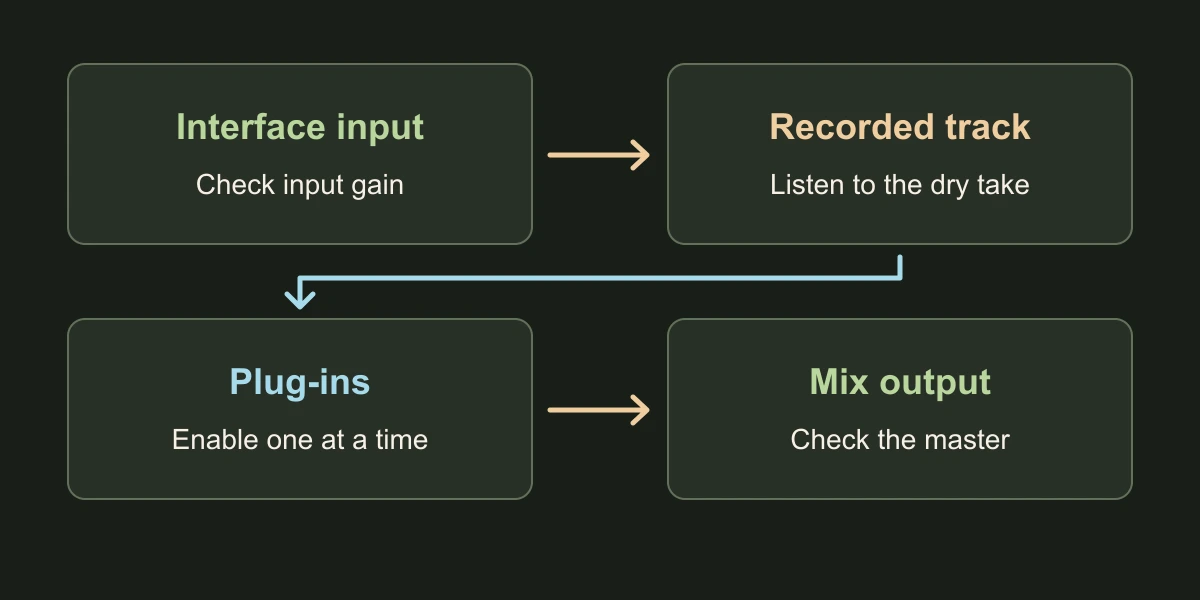
If the raw track sounds distorted when played on its own at a safe level, start at the guitar, pedal and interface inputs. Lowering the track fader turns down what you hear after recording. If the recorded signal already clipped, record a fresh take with more input headroom. If the raw track is clean, add the plug-ins and check the output one stage at a time.
Where the track was recorded
Use the interface’s documented instrument input for a direct guitar. The signal typically passes through the input gain and converter before it reaches the recorded track. The track can then feed an amp simulator, the mix bus and your interface output. Meter positions and recording routes vary, so check the device and DAW settings.
Solo the track and bypass inserts on the track and master. Listen quietly to the recorded passage. Make sure you are listening to playback. If a live guitar feed is also reaching your headphones, check the guide to direct and software monitoring.
Sources: Bobby Owsinski, The Recording Engineer’s Handbook, 5th ed., ch. 4 · Setting the Recording Level / Headroom; Focusrite on interface input gain; Scarlett Solo 4th Gen input controls and meters
Record the same phrase at lower input gain
Use the same guitar settings and play the loudest part of the phrase at your normal performance level. Watch the interface’s input meter or overload indicator and the DAW’s recording input. Lower the interface gain if the input overloads. If a pedal, active instrument or other device is distorting before that point, check its output setting and the interface input mode too.
Record a fresh pass and compare it with the old raw track at a similar, modest listening level. A cleaner take after one change helps locate the problem. A harsh sound or flattened waveform alone gives limited evidence about which device caused it.
Before repeating the take, confirm the source and input mode with the Hi-Z versus Line example. A higher line-level limit alone does not establish suitable loading for a direct guitar.
Sources: Bobby Owsinski, The Recording Engineer’s Handbook, 5th ed., ch. 4 · Setting the Recording Level / Headroom; Focusrite on interface input gain; Scarlett Solo 4th Gen input controls and meters
Check the plug-ins and the mix output
If the dry take is clean, switch on the amp sim and subsequent plug-ins one at a time. Listen for the first point where unwanted distortion appears and check the meters around that stage. An amp model may deliberately add breakup. Check the plug-in’s input trim alongside its output and compare with bypass.
Then check the master or hardware output with the other tracks playing. If the mix overloads while the solo track plays cleanly, reduce the level feeding that output. Keep input gain, playback level and headphone volume separate when you log the change.
How this guide was prepared
We used Bobby Owsinski’s The Recording Engineer’s Handbook, fifth edition, chapter 4, DAW Recording, particularly Setting the Recording Level and Headroom. We also checked Focusrite’s guidance on interface gain and the Scarlett Solo 4th Gen input meter. The procedure is an editorial comparison for a dry guitar track.
Documentation checked .
Added a contextual link to the related worked guide; existing technical claims and source-check date retained.