The decision in brief
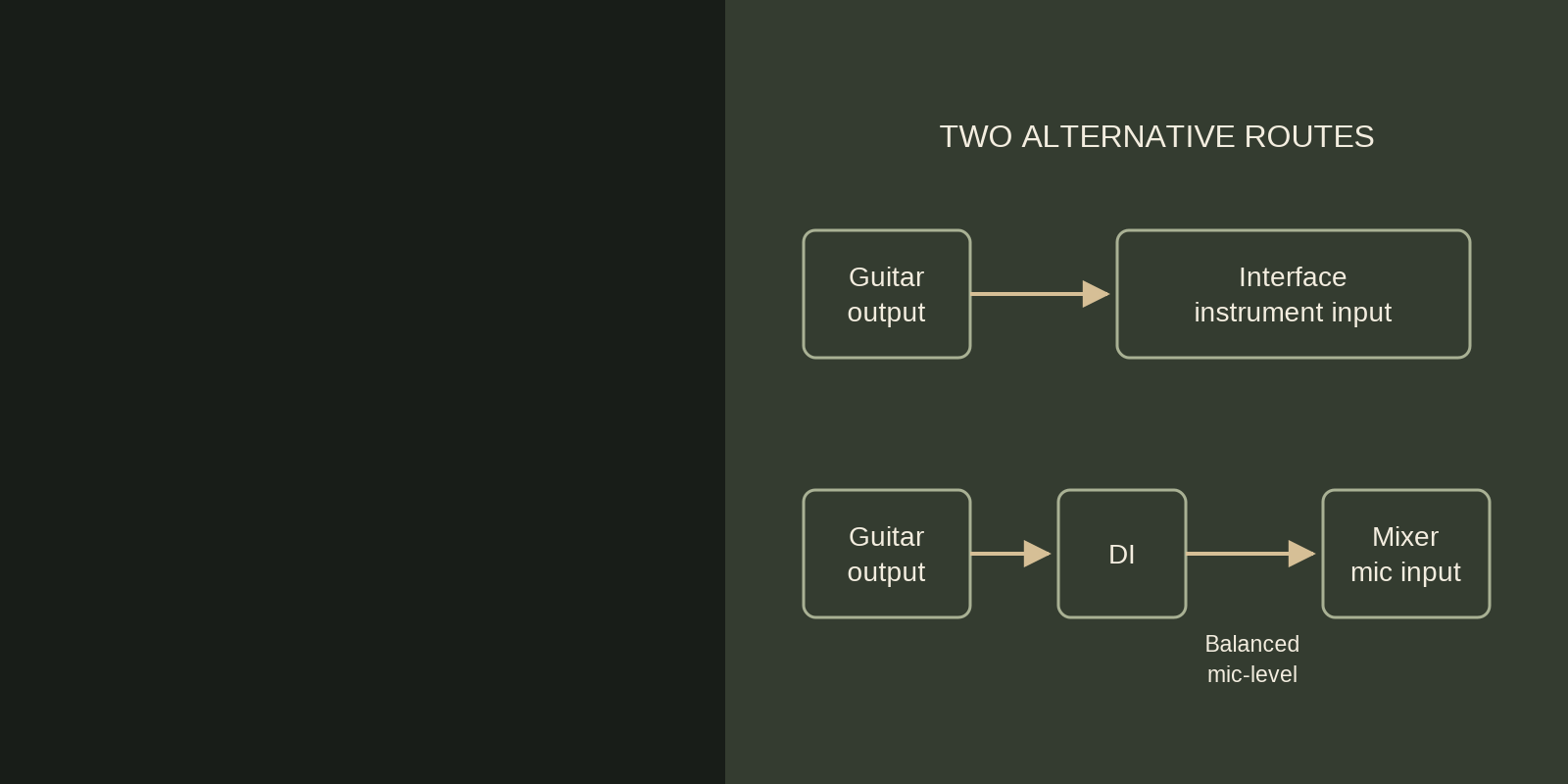
Use a DI box when you need to feed a guitar signal to a suitable microphone input, often over a balanced cable run or while also feeding an amplifier. A supported instrument input on an audio interface can accept the guitar directly. Decide from both devices’ documented connections, input loading and signal levels; a DI is not automatically needed for home recording.
Start with the receiving input
Identify the output you are connecting and the input that will receive it. A guitar pickup output, a modeller’s line output and an amplifier’s speaker output are different connections. Socket shape alone does not tell you the supported level or impedance.
| Your task | First route to check | What still needs confirmation |
|---|---|---|
| Record a guitar directly at an interface | Guitar to a supported instrument input | Instrument mode, gain range and pickup compatibility |
| Feed a mixer or an available interface mic input | Guitar to DI input; DI mic-level output to mic input | DI input load, power and output specification |
| Capture the sound of an amplifier and cabinet | A microphone at the cabinet | Microphone connection and placement; a separate dry track is optional |
| Connect a modeller or preamp output | The output’s documented destination | Mic, line or instrument level; balanced or unbalanced |
Focusrite explicitly describes direct recording through an interface’s instrument input and miking an amplifier as two routes. Its input guidance also describes using a DI to feed a mic input. Adding a box becomes a decision about a connection you need, rather than a required recording ritual.
When the receiving device is an interface, the Hi-Z and Line example separates its instrument mode from the line-input limit. A DI is a separate route to a suitable microphone input.
Sources: Focusrite: instrument, line and mic inputs; Focusrite: direct recording and miking an amplifier
Keep signal conversion separate from the sound you want
A conventional instrument DI converts an unbalanced instrument signal to a balanced, low-impedance, mic-level output for a suitable receiving input. That balanced route can be useful between a stage and a mixing position. It does not guarantee silence, remove noise already in the guitar signal or establish a fixed distance every rig can run.
A dry track captured before the guitar amplifier does not include that amplifier and cabinet’s sound. Decide whether you want a clean source for later processing, the miked amplifier, or both. Some products combine DI, preamp and amp/cabinet processing functions; check which functions the actual device provides.
If a DI has a documented thru connection, it may feed an amplifier input while the balanced output feeds the mixer. Confirm whether that thru is parallel or buffered and what load the complete connection presents. The cable capacitance guide explains why the cable before the first buffer remains part of a passive pickup’s load.
To send a saved dry track back to an amplifier input, trace the reamping send-and-return guide.
Sources: Radial: what a direct box converts; Radial JDI manual: connections, grounding and speaker-output restrictions
Choose by input load, headroom and power
Active and passive describe how the DI works, not a universal quality ranking. A passive transformer DI needs no operating supply; an active DI uses powered circuitry. That alone does not settle the input impedance, maximum signal level, isolation or behavior of its thru output.
For example, Radial’s J48 is an active DI powered by 48 V phantom power. Its manual identifies a pad for unusually high input signals. The JDI is passive and also has a pad. These examples show why neither “active” nor “passive” tells you whether the actual guitar or preamp will overload a device.
For a passive magnetic pickup, inspect the input impedance and the additional amplifier connection, if used. For an active guitar or pedalboard output, check the specified level and the DI’s headroom. Read the required power source before buying; a supply socket, battery or phantom-power requirement cannot be inferred from the word active. The pickup overview separates passive sensing from onboard powered electronics.
Sources: Radial JDI manual: connections, grounding and speaker-output restrictions; Radial J48 manual: power, input, thru and level setup
Give a passive piezo its own compatibility check
A passive acoustic transducer can require a different receiving input from an onboard preamp output. Fishman recommends, but does not require, an impedance-matching preamp for its AG-Series passive undersaddle pickup. That guidance applies to the named family; it is not a specification for every acoustic pickup.
Radial’s PZ-DI provides selectable 220 kΩ, 1 MΩ and 10 MΩ input settings, including a setting intended for piezo transducers. Those values demonstrate model-specific design choices. They do not create a universal minimum for every piezo, prove compatibility or establish which setting you will prefer.
Identify the pickup and any existing preamp before shortlisting another box. If the pickup maker’s recommendation is missing, keep that question open. The acoustic pickup guide covers the separate mounting, string and installation decisions.
Sources: Fishman AG-Series: passive pickup and preamp guidance; Radial PZ-DI: selectable input loads
Make one connection record before soundcheck
Use this proposed routine with the actual manuals. It is a documentation and observation method, not an equipment test performed for this guide.
- Write the source model and output label, then the destination model, input and required mode. Record whether the output is instrument, line or mic level.
- Write the DI model, input setting, output level, power requirement and any thru destination. Resolve an unknown item before connecting.
- Turn down or mute the listening system before making connections or changing phantom power, following both devices’ procedures. Use the specified instrument and balanced audio leads.
- Set the receiving gain using the strongest passage you intend to play. If distortion appears, identify whether it starts at the source, DI or receiver; use a pad only as its manual directs.
- Record the final controls, route and symptom or preference. If a documented ground-lift control changes hum, record that observation. Never remove a mains safety earth to imitate an audio ground lift.
Keep hum, clipping and the desired amplifier sound as separate questions. A clean meter reading does not prove the sound suits the part; a noisy result does not by itself identify a ground loop.
Sources: Radial J48 manual: power, input, thru and level setup; Radial JDI manual: connections, grounding and speaker-output restrictions; Sennheiser: preserve the mains safety ground
Stop at an amplifier’s speaker-output boundary
Do not route a speaker output into an ordinary DI or interface input. A pad switch alone does not approve that connection. Speaker-level capture requires equipment and a complete load arrangement explicitly supported by the amplifier and capture-device manuals.
Radial’s JDI manual illustrates the limits: it states that the JDI is not a load box and prohibits its parallel-speaker feature with bridged or balanced speaker outputs. This guide does not provide a speaker-output hookup procedure. If the amplifier output or required load is uncertain, stop and ask the manufacturers or a qualified technician.
Retain the route that satisfies your recording or live task with documented connections. If your existing interface’s instrument input already does that, there may be no connection problem for a separate DI to solve. For cable duty, continue to speaker cable versus instrument cable.
Sources: Radial JDI manual: connections, grounding and speaker-output restrictions
How this guide was prepared
We checked Focusrite’s recording and input guidance, Radial’s DI explanation and JDI/J48 manuals, Fishman’s AG-Series description, Radial’s PZ-DI specifications and Sennheiser’s safety-ground warning on November 5, 2026. Named devices illustrate documented differences, not product recommendations. The route table and connection record are editorial decision aids. We performed no electrical, noise or listening tests; no universal cable-distance limit, input-impedance target or preferred DI sound is claimed.
Documentation checked .
Added a contextual link to the related worked guide; existing technical claims and source-check date retained.
Sources and further reading
- Radial: what a direct box converts
- Focusrite: instrument, line and mic inputs
- Focusrite: direct recording and miking an amplifier
- Radial JDI manual: connections, grounding and speaker-output restrictions
- Radial J48 manual: power, input, thru and level setup
- Fishman AG-Series: passive pickup and preamp guidance
- Radial PZ-DI: selectable input loads
- Sennheiser: preserve the mains safety ground