Start here
Record whether the whole signal disappears, the added effect is missing or the sound changes unexpectedly. Check the loop controls for your exact amplifier, then trace Send to the pedal input and the pedal output to Return. Keep the amplifier’s required speaker connection in place and use its documented shutdown procedure before moving cables.
Start with the exact symptom
| What you hear | First things to record |
|---|---|
| No sound from the complete rig | Whether the normal guitar-to-amp route works when the loop is disconnected as instructed |
| Dry sound, little or no added effect | Loop enable state, pedal active state, mode and effect level |
| Thin, hollow or unexpectedly quiet sound | Series or parallel routing and whether the return contains dry signal |
| Unwanted distortion or a sudden level jump | Send setting, pedal input range, output setting and return requirements |
Start at a modest listening level. Switch off and follow the equipment instructions before changing connections. Keep a valve amplifier’s required speaker or approved load connected. An effects-send socket carries a different signal from a speaker output, even where their plugs look alike.
If the plain guitar-to-amp route also fails, investigate that route first. A loop comparison has little value until you know which simpler setup works. The amplifier connection guide identifies the separate jobs of signal and speaker connections.
Sources: Marshall DSL5CR Quick Start Guide, printed pp. 2 and 6, PDF pp. 3 and 7
Check the loop controls and trace every lead
Find the controls for the exact amplifier version. Read whether the loop has an enable switch, footswitch function or stored setting. Resolve any uncertainty with the manufacturer. A control that changes channels is not automatically a loop switch.
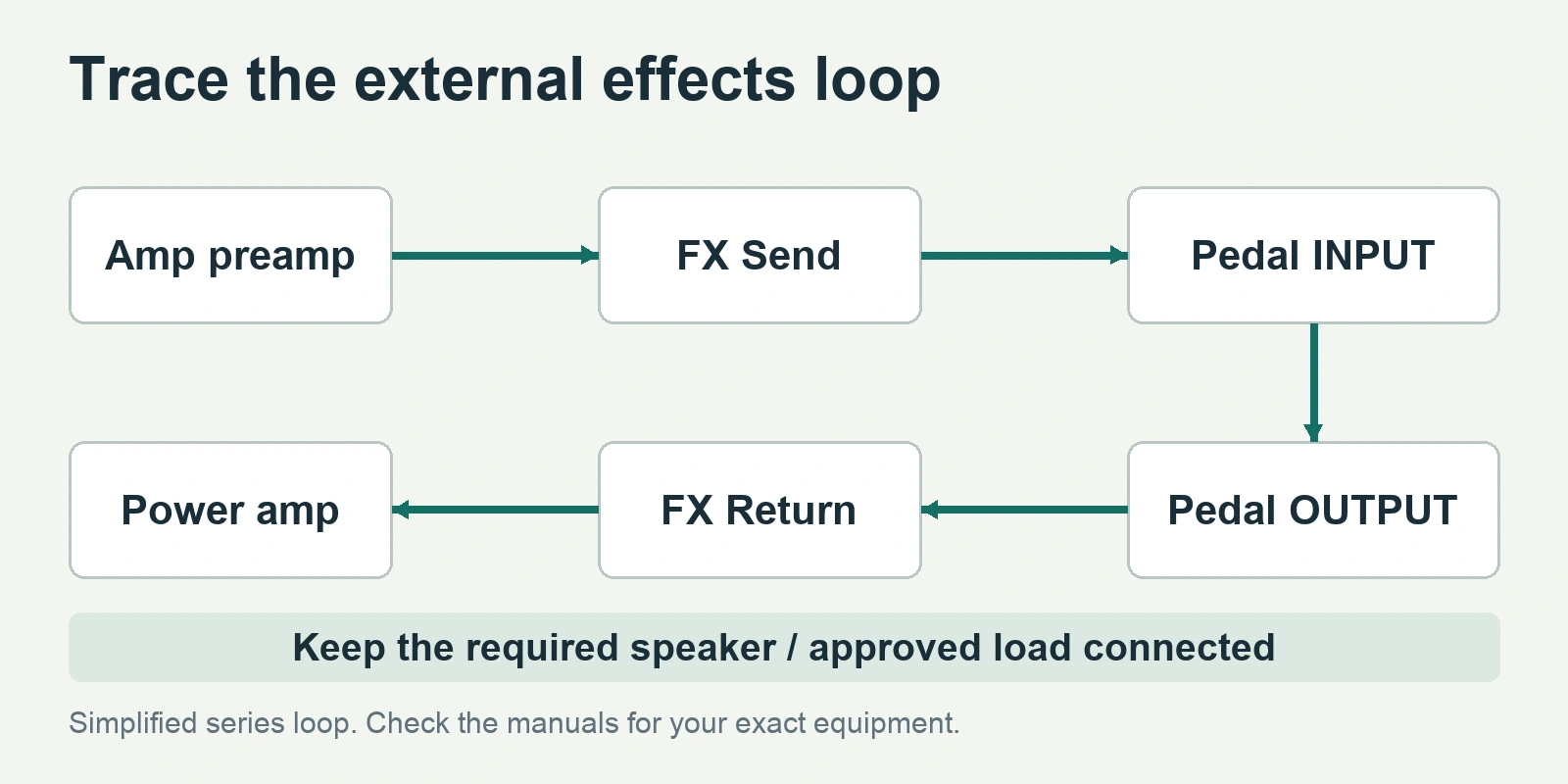
Marshall’s DSL5CR quick-start guide labels FX Send as the connection to an external processor’s input and FX Return as the connection from its output. Trace your leads with those directions in mind. In a conventional one-pedal setup, the route is Send → pedal input → pedal output → Return. Keep the guitar connected to the amplifier input.
Use the pedal’s documented mono jacks for a mono loop. For example, the DD-8 assigns functions according to its input and output connections. Its expression or tempo-control socket has a separate job. Check labels at both ends of each lead before restoring power.
Sources: Marshall DSL5CR Quick Start Guide, printed pp. 2 and 6, PDF pp. 3 and 7; BOSS DD-8 Owner’s Manual on power, controls and connections; BOSS DD-8 Reference Manual, pp. 15–17, connections and Direct Mute
Check pedal power and input compatibility
Verify the pedal supply, voltage, polarity, connector and current requirement against its instructions. If you are unsure which supply is connected, resolve that before the next test. The pedal-power guide explains the checks.
Read what the indicator actually means. The DD-8 manual explains that its CHECK indicator shows effect status and certain functions, and also provides battery information. Its input jacks switch pedal power. A single light therefore cannot answer every power and routing question.
Compare the amplifier’s send specification and any level switch with the pedal’s permitted input range. Then check the pedal output and amplifier return. A nominal reference level alone does not establish input headroom. Ask the makers when the documents do not establish a compatible route.
A quiet downstream setting can still follow an overloaded input. Record the settings around the first stage where unwanted distortion appears. Keep comparisons short, use the documented compatible range and change one setting at a time.
Sources: BOSS DD-8 Owner’s Manual on power, controls and connections
Try a documented simpler path
Where the amplifier’s instructions allow it, remove the pedals and use a known-working instrument cable directly from FX Send to FX Return. Follow the shutdown and reconnection procedure first, and leave the speaker connection alone.
Marshall’s DSL5 support describes this link-cable check. If that route works, investigate the removed pedal path, including its leads, power, modes and level compatibility. The result narrows the search. A pedal could work correctly in another route while being unsuitable for the current send level.
If the link route still fails after documented loop controls are checked, save those observations for the manufacturer or a qualified technician. Stop the trial for intermittent sockets, abnormal smells or other signs of a hardware fault.
When the simple route works, add one compatible pedal with the specified power supply. Try the documented active and bypass states, noting what passes. Add the rest only after that smaller setup is understood.
Sources: Marshall DSL5 support on an effects-loop link-cable check; Marshall DSL5CR Quick Start Guide, printed pp. 2 and 6, PDF pp. 3 and 7
When the effect or dry sound goes missing
If dry sound passes but the effect is absent, check the pedal mode, effect-level control and loop setting. Use a simple audible delay setting at a low listening level. The delay guide explains time, feedback and level separately.
For a parallel loop, check the amplifier’s dry blend alongside the returned signal. Returning another dry copy can cause interaction, particularly if that copy has latency or a changed phase relationship. The amp’s documented routing and the processor’s wet-only options matter.
The DD-8 reference manual gives a specific Direct Mute connection whose output A omits direct sound with the effect both on and off. In a wet-only return, silence after the repeats decay or when bypass is engaged may be expected. Check the complete amplifier output as well as the return path. Read the exact manual to establish dry-signal behaviour in active and bypass states. Return to the pedal-order guide for series and parallel examples.
Sources: BOSS DD-8 Reference Manual, pp. 15–17, connections and Direct Mute; Brian Neunaber via Quilter on parallel-loop signal interactions
Record the successful path
| Record | Detail to keep |
|---|---|
| Equipment | Amp version, pedal model, power source and relevant manual pages |
| Original symptom | Whole signal, effect only, bypass behaviour or tone change |
| Route | Socket labels, lead identifiers and loop enable state |
| One change | The single lead, device or documented setting changed |
| Result | Active and bypass sound, level behaviour and remaining uncertainty |
Download the blank effects-loop check record (English CSV). Bring the original symptom and the simplest successful path to a support request. That is more informative than replacing several components at once and losing track of the difference.
How this guide was prepared
We checked Marshall’s DSL5CR quick-start connection and startup instructions, its DSL5 link-cable support note, the BOSS DD-8 owner’s and reference manuals, and Brian Neunaber’s explanation of parallel-loop interference. We arranged external checks by symptom and supplied a blank change log. The Marshall quick-start PDF is a quick-start document. Its socket labels do not establish every loop-control behaviour.
Documentation checked .
Sources and further reading
- Marshall DSL5CR Quick Start Guide, printed pp. 2 and 6, PDF pp. 3 and 7
- Marshall DSL5 support on an effects-loop link-cable check
- BOSS DD-8 Owner’s Manual on power, controls and connections
- BOSS DD-8 Reference Manual, pp. 15–17, connections and Direct Mute
- Brian Neunaber via Quilter on parallel-loop signal interactions