The decision in brief
A guitar compressor pedal reduces gain when the signal meets its compression conditions. Threshold and ratio describe the level response; attack and release describe how that response changes over time. Output level and any dry blend need separate attention. Start with the exact pedal’s manual, then compare the same playing passage with bypass at a similar listening level.
Decide which change you want to hear
Choose a passage before choosing a setting. You might want accented notes to stand out less, or you might want to preserve a sharp initial attack while controlling the note that follows. Write down that aim and use the same passage throughout the comparison.
For the downward compression discussed here, the processor reduces gain above its threshold. Fender explains threshold, ratio and timing as separate controls. A pedal with fewer knobs can combine those functions or set some internally. Its panel labels are not a complete circuit description.
Compression also cannot decide which note belongs in a musical accent. If the aim is cleaner timing or deliberate accents, include a dry practice pass. Use the lead and rhythm guide to define the musical role of the part.
Sources: Fender: compression threshold, ratio, attack, release and makeup gain
Read the controls as separate questions
| Control concept | Question it answers | What to check on the actual pedal |
|---|---|---|
| Threshold | At what input level does gain reduction begin? | A dedicated threshold control may be absent |
| Ratio | How much does output rise above threshold for a given input rise? | Ratios can be fixed or switched |
| Attack and release | How quickly does gain reduction develop and recover? | Read the manual’s timing and knob direction |
| Output or makeup gain | What level leaves the processor? | A louder result can dominate a casual comparison |
| Dry blend or mix | How much unprocessed signal is combined with the compressed path? | Blend changes the combined response |
The Empress MKII provides a concrete example: its Input control drives more or less compression, its Output control changes level without changing the amount of compression, and its Mix control blends the dry and compressed paths. Its attack time increases clockwise. Those are documented details of this pedal, not a direction rule for every compressor.
A knob labelled “Sustain” needs its own explanation. Do not assign it a universal threshold, ratio or release function from the name alone. Record the model and its control meanings before copying a suggested setting.
Sources: Fender: compression threshold, ratio, attack, release and makeup gain; Empress Compressor MKII manual: compression basics and controls (pp. 5–8)
Work through one ideal ratio example
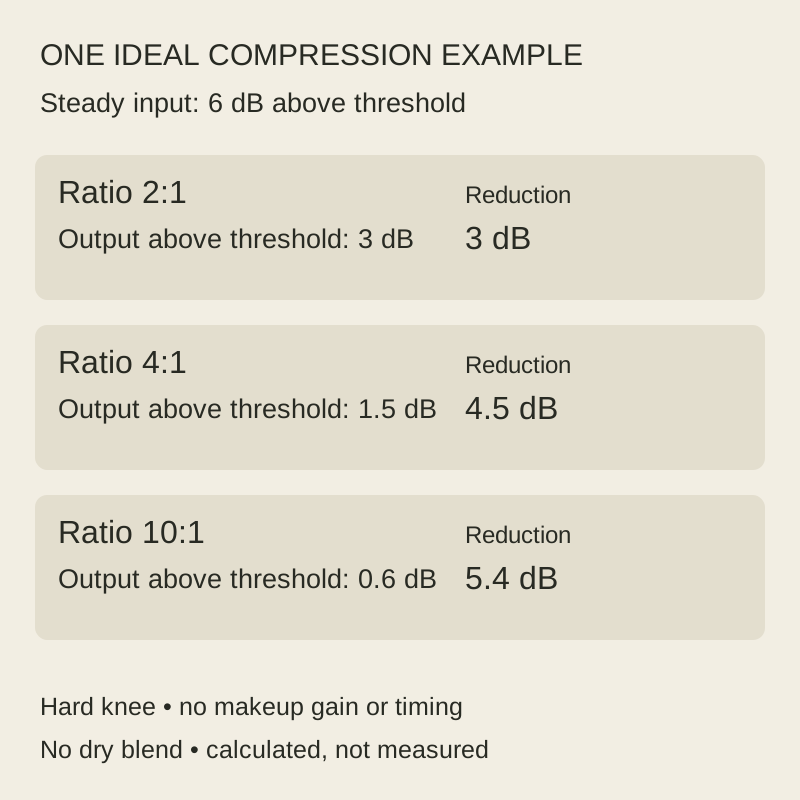
Assume a steady input 6 dB above a fixed threshold, an abrupt transition at that threshold, and no added output gain. Ignore attack and release and use only the compressed path. In that simplified model, output above threshold equals input above threshold divided by the ratio number.
| Ratio | Input above threshold | Output above threshold | Gain reduction |
|---|---|---|---|
| 2:1 | 6 dB | 6 ÷ 2 = 3 dB | 3 dB |
| 4:1 | 6 dB | 6 ÷ 4 = 1.5 dB | 4.5 dB |
| 10:1 | 6 dB | 6 ÷ 10 = 0.6 dB | 5.4 dB |
These are exact decimal results for the stated assumptions. The ratio describes level changes measured in decibels; 4:1 does not mean that the listener hears one quarter of the original volume. The Empress manual uses the same above-threshold definition and offers 2:1, 4:1 and 10:1 choices.
Real note attacks are changing signals. A softer knee, timing behaviour and a dry blend can all make an actual passage differ from this static example. Use the table to understand the ratio label; it does not predict the complete pedal output or recommend a ratio for your playing.
Sources: Empress Compressor MKII manual: compression basics and controls (pp. 5–8)
Compare the same passage at a similar level
Begin with a clean or lightly driven sound that you already know. Keep the guitar, pickup selection, amp gain and playing position fixed. Follow the pedal’s own setup instructions, then play a short passage containing a soft note, an accent and a held note. Leave a pause at the end.
Alternate bypass and effect. Use the documented output control while alternating the same passage in bypass and effect. Bring the levels close enough that switching does not create an obvious level jump before judging which response helps the passage. An approximate match is an owner comparison, not a calibrated loudness measurement. If the pedal automatically changes output gain, note that limitation.
Change one compression control at a time. Listen for the initial pick or finger attack and the following note separately. Then try release changes while repeating your actual rhythm. Describe what happened to that passage instead of calling a setting universally “transparent” or “punchy.”
If the pedal has gain-reduction metering, read it using its manual. A meter can help show that the detector is responding, but its display does not establish that the result suits the song. These steps are proposed; no comparison recording is supplied with this article.
Repeat the check in the complete rig
Return the drive and other effects you normally use, keeping their settings documented. Compare the pedal’s contribution again: the result of a clean audition may not describe the complete chain. For the routing question, use the effects-order guide and check the input and output requirements of each device.
Include the silent pause in your listening record. If you hear more hiss or background sound, record the engaged controls and chain. An audible increase alone does not identify a faulty compressor; added output gain and the rest of the rig need to be considered. This article contains no noise measurements.
Do not change compressor level and overdrive gain together during a comparison. If you want to use the compressor as a boost into a drive stage, that is a separate musical aim. Check its transition deliberately after completing the similar-level comparison.
Keep the setting only if the part benefits
| Record | Useful detail |
|---|---|
| Aim and passage | The accent, note or transition you wanted to change |
| Pedal identity | Model, control meanings and dry-blend setting |
| Bypass comparison | How output levels were brought close and any remaining mismatch |
| Response | Initial attack, held note, repeated rhythm and pause |
| Complete rig | Whether the chosen setting still helped with the usual effects |
A useful result might be a small change, a setting reserved for one part, or choosing bypass. Keep the observations in words you can reproduce at the next rehearsal. Do not treat a clock-face setting copied from another pedal as equivalent timing or gain reduction.
If the passage loses an accent you wanted to keep, return to the last useful setting and repeat one change at a time. The purpose of this record is to connect a control adjustment with a playing decision. It does not certify a model’s performance.
How this guide was prepared
We checked Fender’s compression explanation and the Empress Compressor MKII manual on November 2, 2026. The control details attributed to Empress apply to that model. The 6 dB calculation is an ideal steady-state, hard-knee model without makeup gain, time response or a dry blend. It is not a pedal measurement. The playing comparison is a proposed owner exercise; we tested no pedals and report no preferred setting or measured noise performance.
Documentation checked .