The decision in brief
Read the wireless system’s audio-latency specification for the exact model and mode, then trace the rest of the route to your ears. Digital pedals, software monitoring and speaker distance can add delay beyond the wireless link. Compare the complete rig with a cable at similar level, using the same phrase and listening position. A low millisecond figure alone does not establish comfortable response, reliable reception or input compatibility.
Image note: The hero is an AI-generated editorial illustration of generic wireless equipment and a cable. It is not a photograph of a tested system, a named product or an approved connection. The diagram below is a labeled arithmetic example, not a measurement.
What matters most
- Keep the exact wireless model, operating mode and documented latency together.
- Count each processing stage once and keep electronic delay separate from the speaker-to-player air path.
- Use the real monitoring route for a listening check; record dropouts separately from a delayed response.
Define which delay you are comparing
For a player, latency is the time between an input event and the corresponding sound arriving through a chosen monitoring route. A wireless latency specification is the manufacturer’s published system figure. It does not automatically include your effects, computer, loudspeaker or distance from that speaker.
Shure explains that digital conversion, processing and radio-system mechanisms contribute to wireless audio latency. Radio transmission across a stage is a different process from sound travelling through air. The carrier label, such as 2.4 GHz, is not an audio-delay figure, and a sample-rate label alone is insufficient to calculate the system’s latency.
Write your route before comparing numbers: guitar → transmitter/receiver → effects or modeller → amplifier or monitoring system → ears. Branches matter. The sound heard through software monitoring can follow a different route from a direct-monitor feed.
Sources: Shure: digital wireless processing and complete-system latency
Keep the model, mode and figure together
Two documentation examples show why the conditions belong beside the number. They are not a performance ranking or measurements made by this site.
| Documented system | Published example | Condition to retain |
|---|---|---|
| BOSS WL-20/WL-20L | 2.3 ms | Latency listed in its owner’s manual; the document describes specifications at its issue date |
| Shure GLXD16+ system, GLXD6+ manual v3.3 (2026-J) | 4.53 ms for Groups 1 and 3; 8 ms for Group 2 | Page 34 lists these values for Z3/Z4/Z5 dual-band variants and Z2 2.4 GHz; Z2 also has Group 4 at 8 ms |
Use the document for the receiver/transmitter combination, regional variant and selected group you actually have. Do not substitute an older GLX-D manual for GLX-D+, round different published figures into one supposed family specification, or change a coordinated group solely to obtain the smallest number.
If a specification does not establish the measurement endpoints or operating condition you need, ask the maker. Range, channel count and a matching plug are separate specifications; none establishes the delay or compatibility of the complete setup.
Sources: BOSS WL-20/WL-20L owner’s manual: published latency and wireless checks; Shure GLXD6+ manual v3.3 (2026-J), p.34: group latency
Trace the remaining electronic stages
List the digital devices that the monitored signal actually passes through. A multi-effects processor, interface/software route or digital monitoring stage may contribute additional delay. Use documented or measured figures for the selected routing; an unknown stage is an unknown contribution. Count each non-overlapping segment once. A whole-route or round-trip value may already include buffers; do not add those buffers again.
Focusrite explains that computer audio uses buffers and that the buffer setting is only part of the delay. Lower settings can reduce buffering time while leaving less processing margin. Sample rate and buffer size therefore describe part of a computer route, not the latency of an unrelated wireless system.
The Scarlett 2i2 4th Gen guide shows a Direct Monitor path that avoids the computer. Such a path does not remove delay already introduced by an upstream wireless link or processor. If your desired amp simulation is in the software path, changing the monitoring route can also change which sound you hear. Before judging response, select the intended direct or software feed using the device’s instructions. If both are audible, a doubled sound can confuse the comparison.
Sources: Focusrite: drivers, buffers and other latency contributions; Focusrite Scarlett 2i2 4th Gen guide: Direct Monitor routing
Add the speaker-to-player air path separately
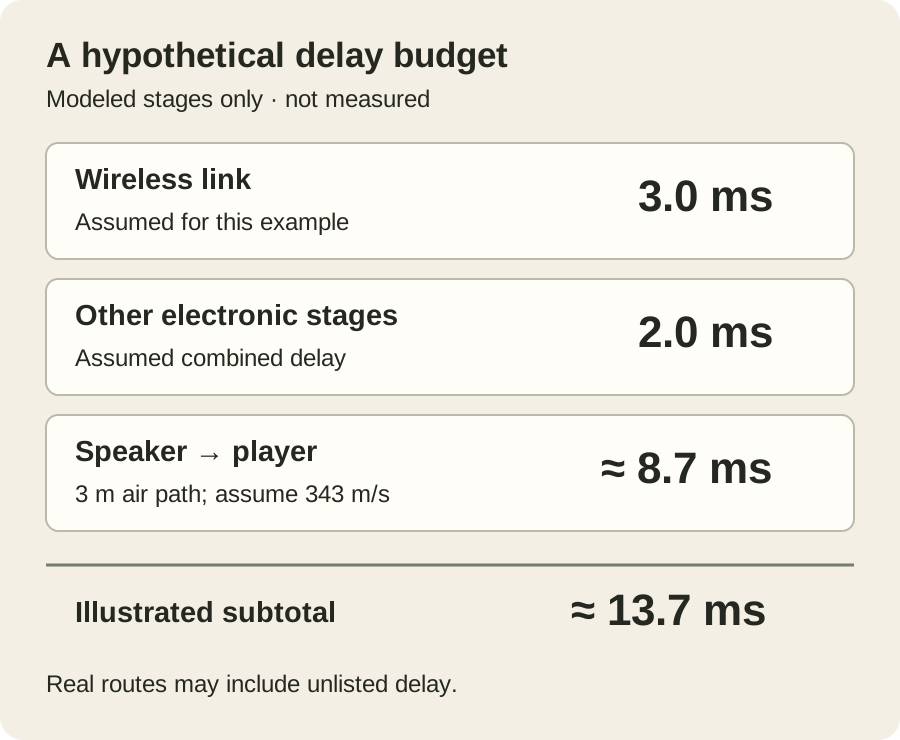
Sound takes time to travel from a speaker to you. NASA’s explanation notes that sound speed depends on the gas and temperature. For an approximate illustration, assume 343 m/s and use time = distance ÷ speed. One metre then takes about 2.9 ms; a 3 m path takes 3 ÷ 343 × 1,000 ≈ 8.7 ms. These are calculations under the stated assumption, not measurements of a room.
Now assume a wireless link of 3.0 ms and another 2.0 ms across the remaining electronic stages in one serial path. Adding the 3 m air path gives an illustrated subtotal of 3.0 + 2.0 + 8.7 ≈ 13.7 ms. The two electronic values are invented solely for this example; no named product is assigned them.
This simplified budget is useful for finding missing stages. It is not a measured total, a prediction for your equipment or an acceptance threshold. Include any omitted conversion, processing or output delay before treating it as a real route estimate. Headphone monitoring removes that particular speaker-to-player distance from the model; its electronic path still needs checking.
Sources: NASA Glenn: sound speed depends on the gas and temperature
Use a repeatable cable comparison
The following is a proposed listening routine, not a test we conducted. Keep the guitar, phrase, downstream settings, listening position and comfortable playback level consistent. Use the connection and power procedures in the exact equipment manuals.
- Start with a known suitable instrument cable and a simple supported monitoring route. Play short muted notes, a familiar rhythm and sustained notes.
- Replace only the guitar-to-receiver portion with the compatible wireless system. Record its model, mode, receiver output and any level or cable-emulation setting.
- Match the useful playback level without changing downstream distortion settings unnecessarily. Repeat the phrase, then return to the cable.
- Add your normal processing and monitoring route in identifiable stages. Note where the feel or audible result changes.
- Record a delayed response, tonal change, clipping and interrupted sound as different observations. Listening alone cannot assign a precise millisecond value or prove the cause.
A looper is not automatically an identical source for this comparison. If it sits after the receiver, its recorded playback bypasses the wireless link being investigated. Our looper guide explains what its position captures. For quantitative testing, use an appropriate documented measurement method and report endpoints, settings, method and uncertainty.
Keep reception and connection checks separate
A consistently delayed note and an audio dropout call for different checks. The WL-20/WL-20L manual links wireless conditions and obstructions to reception problems and describes its own setup procedure. Follow the exact system’s instructions in the intended location, rather than assuming that the lowest latency specification guarantees a stable stage connection.
Confirm the source output, transmitter input, receiver output and next input. A particular active circuit, passive pickup, piezo system or pedal input can require a compatibility check. A quarter-inch connector alone does not establish suitability. Our instrument and speaker cable comparison keeps those signal duties separate; a wireless guitar receiver is not a replacement for an amplifier-to-passive-cabinet speaker connection.
Before relying on the system, try the route and required movement in the actual environment, follow the battery and setup instructions, and retain a workable cabled fallback. That is a proposed preparation routine, not a reliability guarantee.
Sources: BOSS WL-20/WL-20L owner’s manual: published latency and wireless checks
Keep a decision record you can repeat
| Record | Useful entry |
|---|---|
| Wireless identity | Transmitter, receiver, region, firmware where relevant, selected mode/group |
| Specification | Published latency, source/version, endpoints and stated conditions |
| Complete monitored path | Processors, computer/direct monitoring and final headphones or speaker |
| Distance and settings | Speaker-to-player distance; buffer/routing and level settings where used |
| Comparison | Same phrase and position; cabled and wireless observations; unmatched variables |
| Unresolved item | Unknown delay, compatibility question or reception symptom needing investigation |
Choose from the documented requirements and the response of that complete arrangement. If the basic cabled rig already feels delayed, investigate its common processing and monitoring path before judging what wireless adds. If the difference appears only after adding wireless, simplify the route and investigate that change without assigning a number from feel. Keep the preference attached to the equipment, settings and listening conditions you actually compared.
How this guide was prepared
We compared the BOSS WL-20/WL-20L owner’s manual, the Shure GLXD6+ manual v3.3 (2026-J), Shure’s digital-latency explanation, Focusrite’s buffering and Scarlett 2i2 routing guidance, and NASA’s sound-speed explanation. We rendered and visually checked the BOSS specification page and Shure group-latency table. The path budget is an explicitly hypothetical arithmetic example; the listening and record routines are editorial proposals. We measured, connected and performance-tested no wireless equipment and claim no human expert reviewer. The AI-generated hero depicts generic equipment, not a named model or measurement setup. AI assistance supported document comparison and editing.
Documentation checked .
Sources and further reading
- BOSS WL-20/WL-20L owner’s manual: published latency and wireless checks
- Shure GLXD6+ manual v3.3 (2026-J), p.34: group latency
- Shure: digital wireless processing and complete-system latency
- Focusrite: drivers, buffers and other latency contributions
- Focusrite Scarlett 2i2 4th Gen guide: Direct Monitor routing
- NASA Glenn: sound speed depends on the gas and temperature